Faraday Wave
Background3DSeamless loop12 seconds
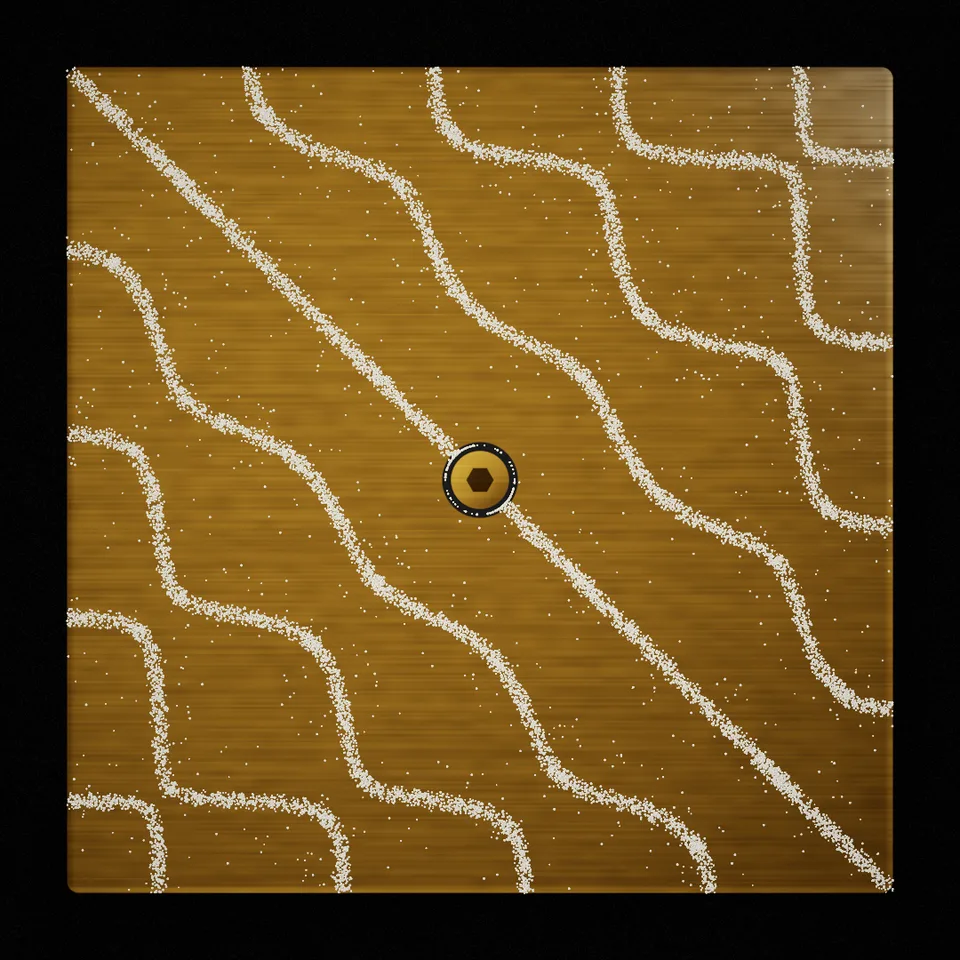
A metal plate shaken at the pitch of a note, sand running into fine lines and lattices, then thrown and settling into the next figure. Loops perfectly.
In Science & maths, Music & sound, Patterns & illusions
Next: Faraday WaveSurprise me
Your current settings go with it. Combine several clips and hand them over together from your sequence.
Presets
How many different notes (figures) one loop holds.
How fine the figures are: higher notes draw more lines.
The number of grains: finer figures need more.
How wide the bands of sand are round the lines.
How violently the sand is thrown between figures.
How much the metal shimmers with the vibration.
The preview runs the same code your AI receives. These settings travel with the hand-off.
The classic experiment of Ernst Chladni, as a quietly hypnotic loop: a square brass (or steel, or copper) plate lies under a soft sliding light, clamped by a bolt at its middle. Each note it is shaken at makes the plate move in some places and stand still along lines; the sand on it runs from the moving places to the still ones and draws the figure. Every few seconds the note changes: the plate is shaken hard, the sand is thrown across it and runs again into a new, more or less intricate figure of lines, crossings and lattices, until the loop comes back to the first. Choose the look (brass, steel, copper or glowing neon sand), how many figures a loop holds, how intricate they are, how much sand there is and how big its grains, how wide the bands are, how violently it is thrown, how much the metal shimmers and the seed that picks the figures.
src/chladni-plate.js is the ingredient your AI reuses. demo.js is only the example scene around it, and uses the demo harness only for the demo.
src/chladni-plate.jscreateChladniPlate({ look?, modes?, order?, grains?, grainSize?, spread?, shake?, shimmer?, seed? }) => { scene, camera, sequence, setSize(width, height), update(time, loopSeconds), dispose() }createBloomPass(renderer, { width, height, glow?, exposure?, grain? }) => { render(scene, camera, output?), dispose() }planModes({ count?, order?, seed? }) => [n, m, sign][]LOOKS: { brass, steel, copper, neon }three@0.185.1 (source) — Renderer, the plate shader, the sand points and the bloom targets.apw-runtime@1.0.0 (demo) — Demo harness.Coordinates: The plate is a square centred on the frame, 86 % of its height wide, with coordinates 0 … 1 across; the bolt is at its middle. Each figure is the zero set of cos(nπx)cos(mπy) + s·cos(mπx)cos(nπy).
Lighting: Self-lit: a soft light from the upper left with a band of light that slides over the brushed metal once per loop; the neon look glows and blooms.
Timing: update(time, loopSeconds) sets the loop phase; frames render in any order.
npm install
npm run render -- chladni-plate/1.0.0 --out my-video.mp4
Needs Node 18+, ffmpeg and Chrome/Chromium. Add --params my-settings.json (from Copy settings) for your own settings.sha256:5fe5b44a93067851…Background3DSeamless loop12 seconds
Effect2DSeamless loop8 seconds
Background3DSeamless loop8 seconds
Background3DSeamless loop10 seconds
Background3DSeamless loop12 seconds
Background3DSeamless loop12 seconds
Background3DSeamless loop14 seconds
Background3DSeamless loop10 seconds