Music Box
3D object3DSeamless loop12 seconds
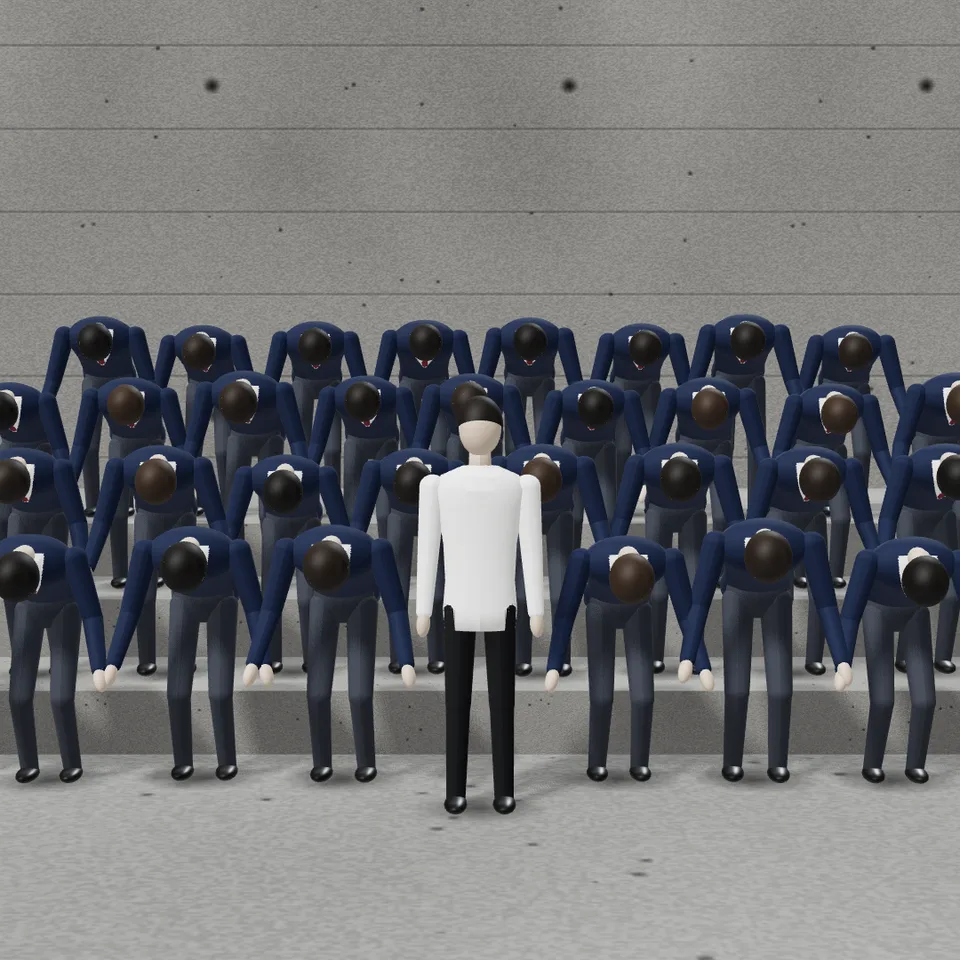
One figure stands perfectly still while rows of identical uniformed figures behind it erupt on the beat, bowing and head-banging in unison. Loops perfectly.
In Music & sound, Nature & weather
Next: Music BoxSurprise me
Your current settings go with it. Combine several clips and hand them over together from your sequence.
Presets
The one figure who never moves.
Beats per minute. The storm always lands on the second bar.
How deep the bows and how hard the head snaps.
0 is perfectly in sync; higher lets each figure land a touch early or late.
Off keeps the camera locked, as in the original.
The preview runs the same code your AI receives. These settings travel with the hand-off.
The look of the STORM trend: a locked-off shot of rows of identical figures in matching uniforms on raw concrete steps, a board-marked concrete wall behind, flat overcast light. For the first bar everyone is frozen. On the second bar the crowd detonates: deep bows, heads snapping back, chests popping, head-banging on every beat, all in sync, while the one figure in front, in a white shirt, never moves. Then they settle and stand still again, so the clip loops. Choose the crowd's outfit, what the still figure wears, the tempo, how hard they move, how tightly they keep time, the number of rows and the light. The figures are faceless mannequins: the crowd is the motion and composition part of the trend, ready for a video model to dress with your own face and footage, or to use as it is as a striking stylised loop.
src/storm-crowd.js is the ingredient your AI reuses. demo.js is only the example scene around it, and uses chrome-material only for the demo.
src/storm-crowd.jscreateStormCrowd({ rows?, perRow?, spacing?, rise?, depth?, outfit?, lead?, beats?, bpm?, start?, energy?, looseness?, contactShadow?, seed? }) => { group, lead, figures, beats, secondsPerBeat, setTime(seconds), dispose() }stormPose(beat, { start?, end?, energy? }) => { bow, head, chest, dip, swing }OUTFITS: { school, black, white, khaki }three@0.185.1 (source) — Renderer, instanced meshes, lights and shadows.chrome-material@1.1.0 (demo) — Studio environment light and renderer settings.apw-runtime@1.0.0 (demo) — Demo harness and loop helpers.Coordinates: Metres: figures about 1.75 tall stand on y = 0; row r stands at height r × 0.32 and depth −r × 0.95; the still figure stands 0.55 in front of the front row at x = 0. The demo camera looks from z ≈ 8.3 at a point 1.3 high.
Lighting: A shadow-casting directional key, a hemisphere fill and a rim light per look (flat overcast, night with a red rim, low golden sun), the studio environment from chrome-material for the sheen, and a soft contact shadow under every figure.
Timing: setTime(seconds) poses every figure as a pure function of time; the routine repeats every `beats` beats. At 120 BPM the crowd is still until 2.0 s, storms until 7.0 s and is still again by 7.6 s.
npm install
npm run render -- storm-crowd/1.0.0 --out my-video.mp4
Needs Node 18+, ffmpeg and Chrome/Chromium. Add --params my-settings.json (from Copy settings) for your own settings.sha256:d085c2067972c849…3D object3DSeamless loop12 seconds
Background2DSeamless loop12 seconds
3D object3DSeamless loop12 seconds
3D object3DSeamless loop12 seconds
Background3DSeamless loop15 seconds
3D object3DSeamless loop12 seconds
3D object3DSeamless loop10 seconds
3D object3DSeamless loop16 seconds