Time Grows Here
Background3DSeamless loopPortrait12 seconds
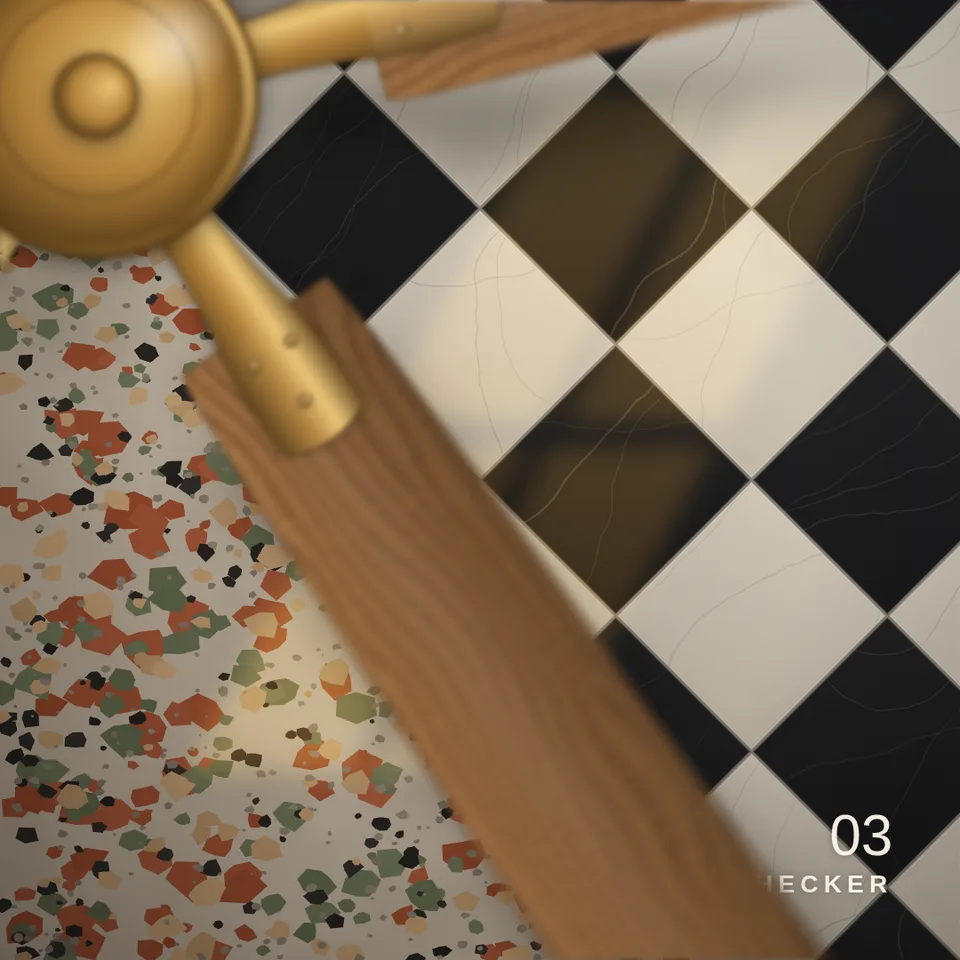
The overhead ceiling fan transition from TikTok: a slowly turning fan right under the camera, and every time a blade sweeps across, the picture below has changed.
Your current settings go with it. Combine several clips and hand them over together from your sequence.
Presets
How many times a blade passes and the look changes in the 8-second loop. 8 is one change a second.
Corner: the hub sits in the top-left corner and the blades sweep diagonally across. Middle: the fan hangs over the centre and the whole picture cuts as a blade crosses the subject.
Sweep: the new look follows the blade across the frame. Cut: the whole picture changes the moment a blade covers the subject. With the hub in the middle it always cuts.
Blur along the turn, as a fraction of a frame. 0 is razor sharp.
Out-of-focus blur on the fan, because it is close to the lens (pixels at 1080).
Number and name each look in the corner, lookbook style.
Changes the wood grain and the floor details.
The preview runs the same code your AI receives. These settings travel with the hand-off.
The ceiling fan trend, rebuilt as a transition you can reuse. The camera looks straight down past a ceiling fan; each time a blade passes over the subject, the look underneath changes, and the cut is always hidden under the blade. The fan is drawn entirely in code: wood-grain or painted blades on metal blade irons, a brass, nickel, black or white motor cap, real motion blur, a soft focus because the blades are close to the lens, and a soft shadow on the floor. Choose the number of blades, the finish, how often the look changes, which way it turns and whether the new look follows the blade (sweep) or appears at once (cut). The demo wipes between four floors under window light; in your project the looks can be anything you can draw: outfits, products, photos, video frames or other ingredients.
src/ceiling-fan-wipe.js is the ingredient your AI reuses. demo.js is only the example scene around it, and uses the demo harness only for the demo.
src/ceiling-fan-wipe.jscreateCeilingFanWipe({ blades?, hub?, hubSize?, reach?, bladeWidth?, finish?, metal?, passes?, direction?, shutter?, samples?, focusBlur?, shadow?, shadowOffset?, lightAngle?, subject?, mode?, seed? }) => { draw(ctx, info, width, height, drawLook), drawFan(ctx, info, width, height), angleAt(time, duration, width?, height?), lookAt(time, duration), passes, blades }apw-runtime@1.0.0 (demo) — Demo harness and seeded random numbers for the floors. src/ceiling-fan-wipe.js has no dependencies.Coordinates: hub and subject are fractions of width and height from the top left; sizes are fractions of the shorter side. Angles in radians, clockwise on screen.
Lighting: The fan carries its own light: a sheen on the blades that brightens as they turn toward the light direction (lightAngle), lit blade edges, a metal cap with a glint, and a soft floor shadow offset by shadowOffset. Match lightAngle and shadowOffset to the light in your looks.
Timing: Pure function of info.time and info.duration. The look index changes exactly when a blade centre line crosses the subject; lookAt(time, duration) returns it, starting at 0.
npm install
npm run render -- ceiling-fan-wipe/1.0.0 --out my-video.mp4
Needs Node 18+, ffmpeg and Chrome/Chromium. Add --params my-settings.json (from Copy settings) for your own settings.sha256:963098383927f554…Background3DSeamless loopPortrait12 seconds

3D object3DSeamless loop12 seconds
3D object3DSeamless loop16 seconds
3D object3DSeamless loop16 seconds

3D object3DSeamless loop16 seconds
3D object3DSeamless loop20 seconds
3D object3DSeamless loop16 seconds
3D object3DSeamless loop16 seconds