
Kinetic Title Reveal
Text layer2D4 seconds
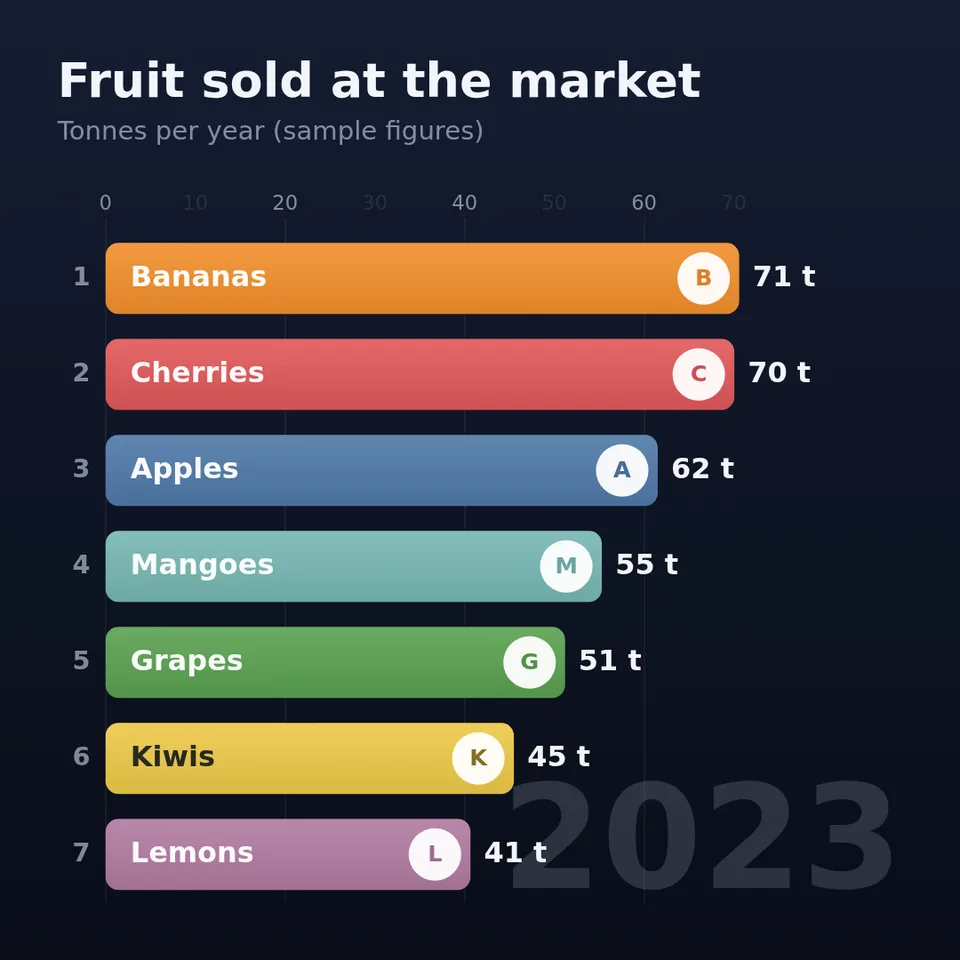
The racing bar chart: your names and numbers over the years, bars overtaking each other until a winner emerges.
In Text & data
Your current settings go with it. Combine several clips and hand them over together from your sequence.
Presets
One entry per row, rows separated by ; — a name, then one number per period. Example: Apples 42 48 55; Pears 30 45 50
One label per number: 2019 2020 2021, or Jan Feb Mar, or with commas when labels have spaces (Week 1, Week 2). A single year counts up.
For example $ or €.
For example k, % or pts.
The preview runs the same code your AI receives. These settings travel with the hand-off.
Type your entries and their values for each period (years, months, weeks) and watch them race: bars grow and slide past each other, values tick up and the period rolls over in the corner. Choose the title, the units, how many bars are on screen, a dark or light theme and a colour palette. The sample figures are made up; replace them with your own.
src/bar-chart-race.js is the ingredient your AI reuses. demo.js is only the example scene around it, and uses the demo harness only for the demo.
src/bar-chart-race.jscreateBarChartRace({ entries, periods?, title?, subtitle?, prefix?, unit?, decimals?, visible?, palette?, theme?, badges?, background?, duration?, intro?, hold?, fontFamily? }) => { draw(ctx, { time }, width, height), valuesAt(time), ranksAt(time), periodAt(time), timing }parseRaceData(text) => { name, values }[]parsePeriods(text, count) => string[]PALETTES: { vivid, pastel, neon }THEMES: { dark, light }apw-runtime@1.0.0 (demo) — Demo harness.Coordinates: Fills the canvas it is given, any aspect ratio; title top left, the period bottom right.
Lighting: None.
Timing: draw is a pure function of time: 0.8 s for the bars to grow in, the periods spread evenly, then 1.5 s on the final standings.
npm install
npm run render -- bar-chart-race/1.0.0 --out my-video.mp4
Needs Node 18+, ffmpeg and Chrome/Chromium. Add --params my-settings.json (from Copy settings) for your own settings.sha256:8750200e31d0d5be…Text layer2D4 seconds
Text layer2D5 seconds
Text layer2D8 seconds

Text layer2DSeamless loop6 seconds
Text layer2D6 seconds
Text layer2DSeamless loop10 seconds

Text layer2D7 seconds

Text layer3D9 seconds